
New version released May, 05, 2024
Version: 4.6.1.25052 - date: 2025-05-22
This new version, 4.6.1.25052, replaces 4.6.1.25051, and provides the following error fixes
- Error fix: Use of Events for Reports and Advanced search returned "No data found".
- Error fix: Labels with common names failed.
- Error fix: Some of the Event reports failed.
Version: 4.6.1.25051 - date: 2025-05-05
We are pleased to announce the release of IrisBG version 4.6.1.25051, featuring a range of new enhancements designed to support and strengthen your botanical record-keeping.
This latest update introduces custom attributes for Accession items, enabling even more detailed and tailored documentation of your plant collections. Additionally, two new Locality fields have been added, allowing for greater precision in recording information about wild-collected material.
The data import functionality has also been significantly expanded. You can now import data related to Accession files, Determination history, and other key records, streamlining your workflows and improving data management.
Following valuable input from our recent IrisBG Working Group session with community members, we are excited to announce that Observations are now available to support all your Phenology data recording needs.
This article outlines how these new updates—and others—can help you enhance the stewardship and protection of your plant collections.
🌱 Download and install the new version from our dedicated Software page.
⚠️ Important: Install the update on all computers using IrisBG. A valid license is required.
Table of Contents
- Accessions
- Configurations
- Data import
- Definitions
- Events
- Garden Explorer
- Reports
- Reports & Labels
- Taxa
Accessions
Custom attributes have been added for Accession items.
We are excited to announce that custom attributes can now be added to Accession items. This new functionality provides greater flexibility in capturing and managing detailed information specific to your collection needs.
An example of Custom Attribute use for an Accession item.
Custom attributes are fully supported across Reports, Advanced Search, and Data Import, making it easier than ever to record, access, and analyze your data. The IrisBG reference guide has been updated to reflect the rules for importing your Accession item custom attribute data.
| AtrI_[field name] | o | o* | Text | Custom attributes. For an attribute of type Code the code value must be given. For an attribute of type CodeMulti code values must be given separated by comma. *For updating the value must be given as: New value | Old value |
As seen under the Accession item data import rules in the IrisBG built-in reference guide | Usage: data import files.
New field: Collection comment
We have introduced a new field to capture Collection Comments for wild-collected plant material. These fields allow you to record important contextual information about the collection event, providing richer detail and supporting more comprehensive documentation of your wild-origin accessions.
An example showing the use of the Accession Collection comments field.
Determination fields adjustment
|
We’ve removed default values for:
|
|
Now, if these fields are left blank, they will remain empty.
Existing placeholder values will be automatically cleared.
New verbatim locality field
The new Verbatim Locality field captures the imprecise locality of a collection site as recorded by the collector. This free-text field preserves notes such such as "USA, Ohio, along the road".
⚠️ More exact locality descriptions (that could be mapped) should be added to the Locality screen in the Orig. locality field to best denote accuracy and provenance, facilitate future usability of your collection records, and support detailed georeferencing and historical research.
New field: Item status comment
|
Accession > Items: We added the field Status comments so that more detailed notes can be added to describe an item status update. |
-
- Three new Propagation fields have been added to Accession Items screen:
• Prop. needed (date)
• No. germ. (number)
• Germ. rate (%) — calculated automatically based on Quantity and Number Germinated.
- Three new Propagation fields have been added to Accession Items screen:
Configurations
Configurations > SSO: We removed the LDAP dependency. Domains and workgroups are supported. Be sure to updated existing definitions.
What does "LDAP dependency" mean?
Previously, our Single Sign-On (SSO) feature required a direct connection to LDAP (Lightweight Directory Access Protocol). LDAP is a system that allows applications to look up and verify user information from a central directory, typically used in large organizations. This requirement meant SSO could only work if your system had an active LDAP connection.
What has changed?
We have removed the LDAP dependency, meaning SSO no longer requires a connection to LDAP to function. You can now configure and use SSO with a broader range of domains and workgroups, even if you don’t use LDAP.
Can you still use SSO?
Yes. SSO is still fully supported. It now works in more environments and is easier to set up. If you already use SSO, you simply need to update your existing configuration.
- Verify the "Logon user" in Management > Personnel matches the user who logs into the computer.
|
|
|
2. Next, click the Edit button. Then, enter your domain, in Maintenance > Configurations: SSO configuration. And select Yes for SingleSignOn.
3. Press Test, and then, Save.
Data import
We have expanded the Data Import module to support additional record types and improved data handling. These enhancements offer greater flexibility and efficiency when importing and maintaining your collection data. They include:
- Accession > Files and Accession > Determination History can now be imported directly.
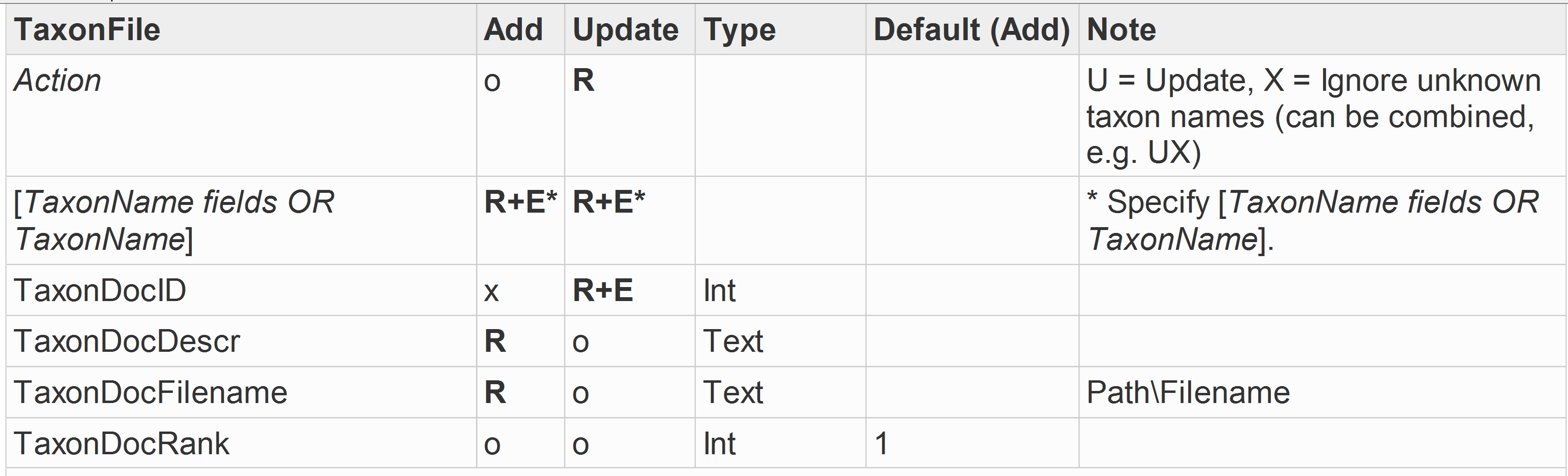
- Taxon > Files have been added to the available import options.
- Support for formatted date fields (fields named *DateFmt) has been introduced, allowing for more accurate date data handling.
- It is now possible to import data for Taxon Infrageneric Groups, streamlining the management of complex taxonomic structures.
- The field ItemRef|ItemRefNo has been renamed to ItemAccRef|ItemAccNoRef.
Below are the data import rules for each of these data import introductions, as updated in the IrisBG built-in reference guide | Usage: data import files.
Accession > Files
Accession > Det. history Determination history
Taxon > Files have been added
 Support for formatted date fields
You can now use formatted date fields (named *DateFmt) when uploading dates with data import.
For example:
- yyyy-mm-dd (ISO format, recommended). If not known, mm and dd can be set to 00.
- yyyymmdd. If not known, mm and dd can be set to 00.
Import data for Taxon Infrageneric group
Data Import > AccessionItem: We renamed the ItemRef|ItemRefNo
|
The drop down shows:
|
|
Definitions
Definitions > Report & label types
Fields with an underscore (_) such as Custom Attributes and Common Names must now be explicitly added to the Fields list in Report/Label definitions (for performance reasons).
The Management Report types screen is where you manage the output of your data.
Events
New observations module
Designed originally for Phenology tracking, the new Observations module supports flexible data recording for the following plant life cycle events:
- Flowering
- Fruiting
- Pests
- Disease scouting
- Other observations
| This feature stems from discussions with our IrisBG Phenology Working Group, aiming to make phenology data easier to collect, share, and integrate. |
An example of an Observation recording in IrisBG
|
⚠️ Important:
|
Garden Explorer
A clarification
To display Themes on your Garden Explorer page, the description must be entered under the corresponding Taxon Details screen.
🌱 Contact us to enable Themes for your Garden Explorer search page.
An example of a Taxa theme and its description in The Taxa Details screen.
Reports
To reflect our newest software updates and fulfil reporting feature requests, we've added the following fields to the Reports query builder:
Events reports now include Observations.
We added permit fields to Accessions, Items and Exchanges reports.
Restriction fields are now available for Exchanges and Loans.
Reports & Labels
We clarified Parentage information for Labels & Reports:
|
Parent 1 Taxon Name and Parent 2 Taxon Name refer to fields under Accessions > Parentage.
Taxon Parent 1 Name and Taxon Parent 2 Name refer to Taxa records.
Thank you!
We hope you find these new features useful in supporting your vital work stewarding plant collections.
🌱 Questions or feedback? Please reach out to our team!
Comments
0 comments
Please sign in to leave a comment.