
The Personnel screen enables you to add and manage individuals associated with your collection or institution. Once personnel have been added, their names will appear in the User accounts screen — where you can create individual user accounts and grant access to IrisBG.
🌱 Note: Both the Initials and Logon user fields must be unique.
How to add Personnel 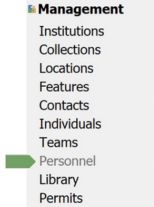
- In the Authorization group of the Navigation Panel, click Personnel.
- Click Clear/New
if information is already displayed in the Properties section, the right side of the screen.
- Next, fill in the fields you wish to register.
- Required fields: Initials and Last name
- All other fields are optional but recommended for complete records.
- Click Save
⚠️ Important: The Initials cannot be changed after registration.
Example: Add a new Volunteer
Let’s add our new volunteer, Valerie.
Follow the steps above — enter her initials, last name, and any additional details — then click Save.
⏭ Next: Add Roles and Permissions in IrisBG
Comments
0 comments
Please sign in to leave a comment.